AWS Outposts Migration Security Considerations: Part 1

AWS Outposts moves the AWS cloud services into your onprem data center. It is a hybrid-cloud platform from Amazon Web Services that extends AWS infrastructure and services into your own datacenter, colocation facility, etc. With AWS Outposts, AWS ships you AWS-designed racks with pre-configured servers. This provides:
- AWS APIs and tooling
- EC2 / EBS / EKS / etc capabilities
AWS physically install the hardware in your facility (that meets facility, networking, and power requirements), but:
- AWS owns the hardware
- AWS manages the infrastructure
- AWS patches and maintains it
- it appears as an extension of an AWS Region.
More information can be found here.
Assumptions
This section captures assumptions made while writing this document.
- Let’s consider a MicroServices Architecture that has multiple services that communicate with each other and one or more databases.
- The MicroServices are written in Java; most are SpringBoot (or at least Spring Framework).
- The security model for communication between these services is unknown and not necessarily important for this discussion.
AWS Outposts Architecture
To facilitate everyone operating under the same set of assumptions, the following architectural details of AWS Outposts are provided.
The AWS Outposts network reference architecture can be found here.
See here for a more high-level view of the AWS Outposts architecture.
The published HA design whitepaper for AWS Outposts from Amazon is available in here. If the reader is not familiar with how this works, it is strongly recommended to read and understand these details.
Further exploration of the AWS Outposts architecture / design is beyond the scope of this security assessment.
Considerations
Moving one’s microservices from an on-prem Virtual Machine (VM) environment to AWS Outposts isn’t just a lift-and-shift. It’s a shift in:
- Trust boundaries
- Control planes
- Failure modes
- Mindset
Roles & Responsibilities
If you treat it like “just another vendor rack in your data center,” you are probably going to miss where the real risks creep in.
From the FAQ, “As AWS Outposts racks run at the customer’s data center, under the AWS Shared Responsibility model customers own the responsibility for physical security and access controls around the Outpost for compliance certification.” For many of the industry certifications to apply (HIPAA, HITRUST, PCI, SOC, etc), there are things you as the customer must do.
To get started, read the Security section of the AWS Outposts User Guide. See here.
Network Design
General Vendor Network Integration
An organization should consider deploying a Vendor DMZ for all communication with your business partners, vendors, suppliers, and other organizations. See the blog post I recently published on this topic here. I generally prefer to keep this isolated from customer traffic’s ingress / egress, but that may not always be possible.
Risks
Risks include:
- A vendor / business partner / supplier may have greater access to your onprem network than intended.
- The vendor’s network may be compromised, at which point, your network is compromised.
- Similarly, your cloud-hosted environment may be compromised and there is then a path to your onprem AWS Outposts environment (plus, potentially, the rest of your onprem network).
Mitigations & Controls
- Limit access to your onprem network through firewalls and IDS / IPS systems.
- Utilize the Vendor DMZ pattern to provide additional security controls in place (for example: Web Application Firewall, Data Loss Prevention). Several additional security capabilities are described in the Vendor DMZ blog post.
- Limit access to your AWS Outposts environment through AWS network security services.
Internet Access
A critical network design question is how internet access will be provided: through the service link + AWS Region or through your local data center’s network. See here for a discussion of design considerations. Either one can be done securely, but the decision around how to do this must be intentional and will be a driver in the rest of the security architecture.
Risks
Risks include:
- Unrestricted internet access may allow unintended communication outside your trust zone.
- If you are not intentional in the network architecture choices you make, it may be difficult to properly secure.
Mitigations & Controls
- Proactively design your network and the security architecture protecting it.
- Follow best practices in the AWS Outposts documentation for internet access.
Data Protection
Data confidentiality should be maintained by always using encryption with data at rest and in flight. See here.
RSA256 or stronger encryption algorithms should be used.
AWS Outposts hardware encrypts all data at rest. The key material is wrapped to an external key stored in a removable device, the Nitro Security Key (NSK). The NSK is required to decrypt the data on your Outposts rack. As always, you can use Amazon EBS encryption for your EBS volumes and snapshots. Amazon EBS encryption uses AWS Key Management Service (KMS) to store encryption keys.
AWS encrypts in-transit data between your Outpost and its AWS Region. See here. To ensure data is encrypted in transit along all network paths, TLS v1.2 or higher is recommended for every network connection. X509 private / public key pairs can be stored in AWS Certificate Manager.
Risks
Risks include:
- If data is not encrypted with strong encryption at rest and in transit, it may be intercepted under a variety of potential scenarios.
- This paper does not attempt to enumerate all possible scenarios.
Mitigations & Controls
- Use encryption at rest and in transit as described in this section.
- AWS Outposts encrypts all file systems by default. Don’t do anything unusual that would allow one to bypass this capability.
- Additional message-level, database row / table level, field-level, encryption may be required.
Availability
Part of any environment’s security is maintaining availability even in the face of component failure. See here & here for a detailed discussion of High Availability (HA) design with AWS Outposts. The HA design an organization chooses will be at the intersection of uptime requirements and financials. As you get closer to 5 9’s, the cost grows exponentially. If anyone tells you otherwise (I’ve had many), point them to here, here, and here.
HA design details are beyond the scope of this document.
You probably can’t afford to achieve 5 9’s — it’ll be okay. At least, eliminate all single-points-of-failure from your architecture and ensure failover for each component can happen automatically — that’s usually enough.
Risks
Risks include:
- A single point of a failure can cause an outage to the whole system.
- Not satisfying uptime requirements mandated by contracts, reputation, or regulations.
Mitigations & Controls
- Design redundancy into your system sufficient to ensure required uptime within available financial constraints.
Shared (If Not) Blurred Responsibility Model
Who’s actually responsible for securing what in this brave new world?
In your on-prem data center (your starting point), you owned everything in the technology stack. As such, you were responsible for all management aspects of this setup
With AWS Outposts:
- AWS manages the hardware and control plane
- That Control Plane has a UI (AWS Console) and API layer (AWS Management API) that is now facing the public internet.
You (or your organization) still manages :
- Physical security and access control to the data center environment.
- Sufficient power, space, and cooling to keep the Outpost hardware operational
- Network connections
- workloads (a euphemism for your applications and all the supporting parts)
- OS
- IAM
- configurations
From here, we have the following Shared Responsibility Model diagram:
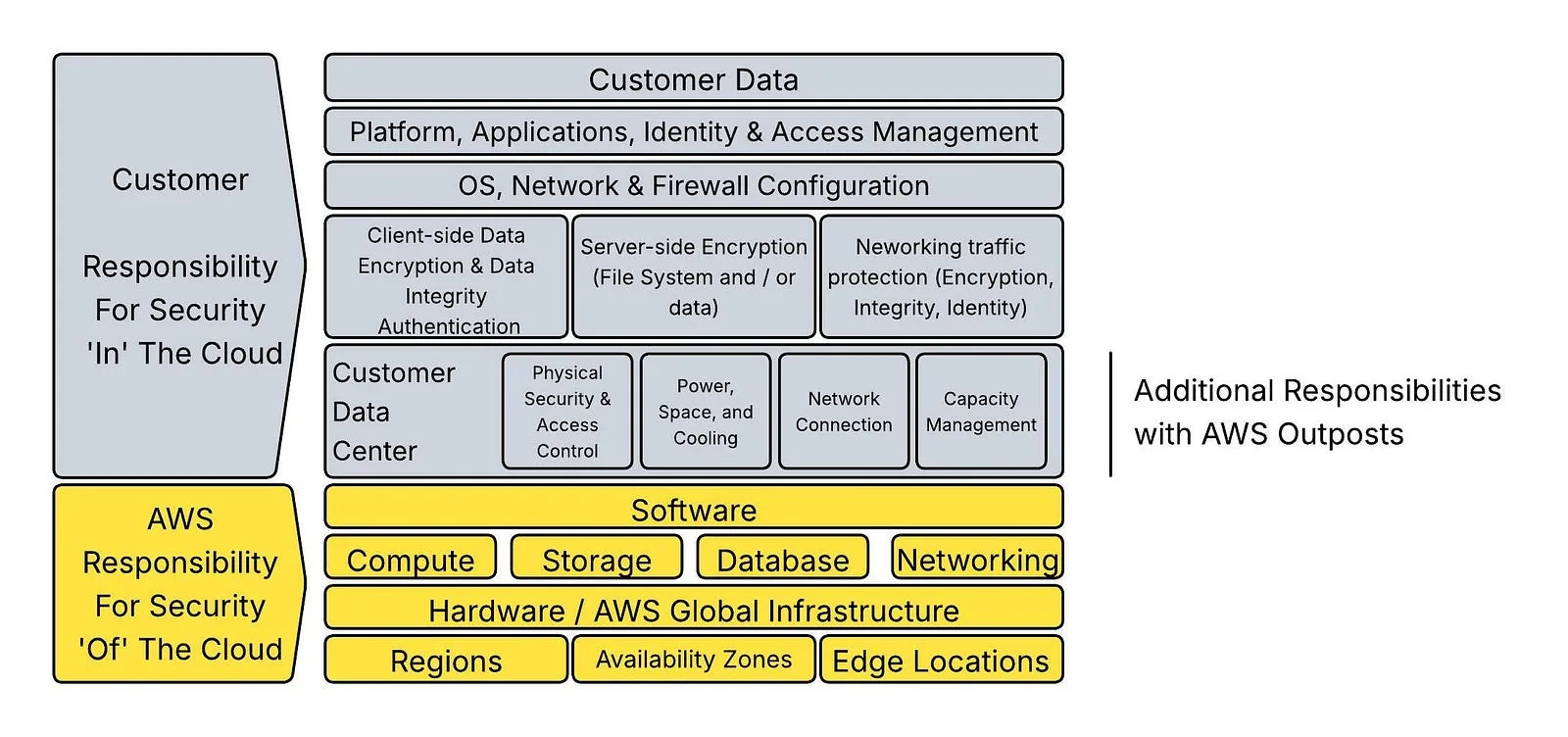
AWS Outposts Shared Responsibility Model
Risks
Organizations often assume AWS is covering more than it actually does. This can lead to gaps in:
- patching
- logging
- access control
- holistic understanding of your end-to-end architecture and security posture.
All risks associated with the control plane of a public cloud now are also part of your environment’s risk profile. The fact that your organization has embraced AWS (or any cloud provider’s) technology means that you’ve already accepted the risk for your cloud workload deployments. The deployment of AWS Outposts has expanded that risk acceptance to your onprem technology footprint as well.
Mitigations & Controls
- Understand what AWS does and does not do for you when AWS Outposts is being used. Read the documentation. See here.
- Clearly define Roles & Responsibilities within your organization.
- Incorporate patching of EC2 OS, middleware products, dependent packages used in the AWS Outposts-hosted environment into existing patch management processes.
- Don’t forget about the network equipment that had to be installed. Some of it is your responsibility
- Ensure your data center facilities team understands the power, cooling, and other physical requirements for the AWS Outposts hardware.
- Obviously, physical security of your data center must be addressed. This is assumed to already be the case for this assessment.
- Develop plan for incorporating logs from AWS Outposts-hosted components into your logging architecture (Splunk, AWS CloudWatch, etc).
- Do the same for Security Incident Event Management (SIEM) integration.
- Access control is discussed below.
The nature of these controls is, ideally, going to be driven by what your organization already does to satisfy these requirements onprem or in the public-cloud-hosted (AWS) environment. If these controls / mitigations / capabilities are not already in place, then you have an opportunity to (or, at least, takes steps towards) addressing the gap as part of the current effort.
AWS IAM Sprawl and Misconfiguration
Outposts integrates tightly with AWS identity systems such as:
- AWS Identity and Access Management
- AWS Security Token Service
These are complex services to manage and configure securely even without AWS Outposts in the picture.
Risks
The increased complexity and additional AWS service dependencies create new attack surfaces. This can potentially include:
- Overly-permissive IAM roles
- Poor role assumption boundaries
- Long-lived credentials lingering in microservices
There is a tendency among development teams to become impatient with the process required to find the minimal permission set required for a workload and just grant admin / full access to all resources the workload interacts with. This is usually preceded immediately with an assumption that they’ll come back to it. I’ve been in more shops that never got back around to it than ones that did.
As noted above, this is now worse than when we were just discussing onprem because now you’ve got a control plane UI that must be properly secured and API-driven privilege escalation paths instead of just internal network-level access.
Mitigations & Controls
- Access to the AWS Console should require:
Single Sign On with your central Identity Provider
Multi-Factor Authentication (ideally, managed by the central Identity Provider).
- All workloads should be assigned an AWS IAM identity that has no (or minimal permissions), then intentionally grant each permission to a role that is known to be required. Iterate on this until you get your workload to a functioning state.
- In each iteration, grant the minimum level permission that is required.
- If it needs read access, do not grant admin / write / global access to the resource.
- Put processes (automated or manual, automated preferred) that rotates secrets (API keys, OAuth2 client secrets, username & passwords, etc, etc).
Summary
Check out Part 2 for the exciting conclusion.
Notes
- AI / GenAI / ChatGPT / etc were not used to generate the text of this article.
- ChatGPT was used to generate some of the images used.
- I used em dashes in my writing before the current GenAI wave was a thing. Not planning on changing now.
- Names have been changed to protect the guilty.
- None of the hostnames or users used in examples actually exist.
- Feel free to post any comments or suggestions below.
Originally published on Medium.